Android Plataforma - Part 11: Building a DSL to customize the new options
By Rodrigo Sicarelli 2 min read Updated
In the previous article, we parameterized the arguments of applyAndroidApp() and appyAndroidLibary() with models.
Now the androidApp() and androidLibrary() functions need to be modified to apply the right decorations to the modules.
Setting the values through a DSL
Inside our androidApp() and androidLibrary() functions, we could simply accept a model:
fun Project.androidApp(androidAppOptions: AndroidAppOptions) = applyAndroidApp(androidAppOptions)

fun Project.androidLibrary(androidLibraryOptions: AndroidLibraryOptions) = applyAndroidLibrary(androidLibraryOptions)
This is a perfectly valid approach! But when it comes to consuming it, we end up with the “boilerplate” of defining a new class:
    androidApp(
        androidAppOptions = AndroidAppOptions(
            applicationId = "com.rsicarelli.plataforma",
            ..
        )
    )
That’s pretty verbose, and it also strays a bit from the “conventional” DSL style we find in build.gradle.kts files.
To solve this, let’s introduce a DSL that handles this customization in an elegant, idiomatic Kotlin way.
Note that here we’ll define the default values for our platform.
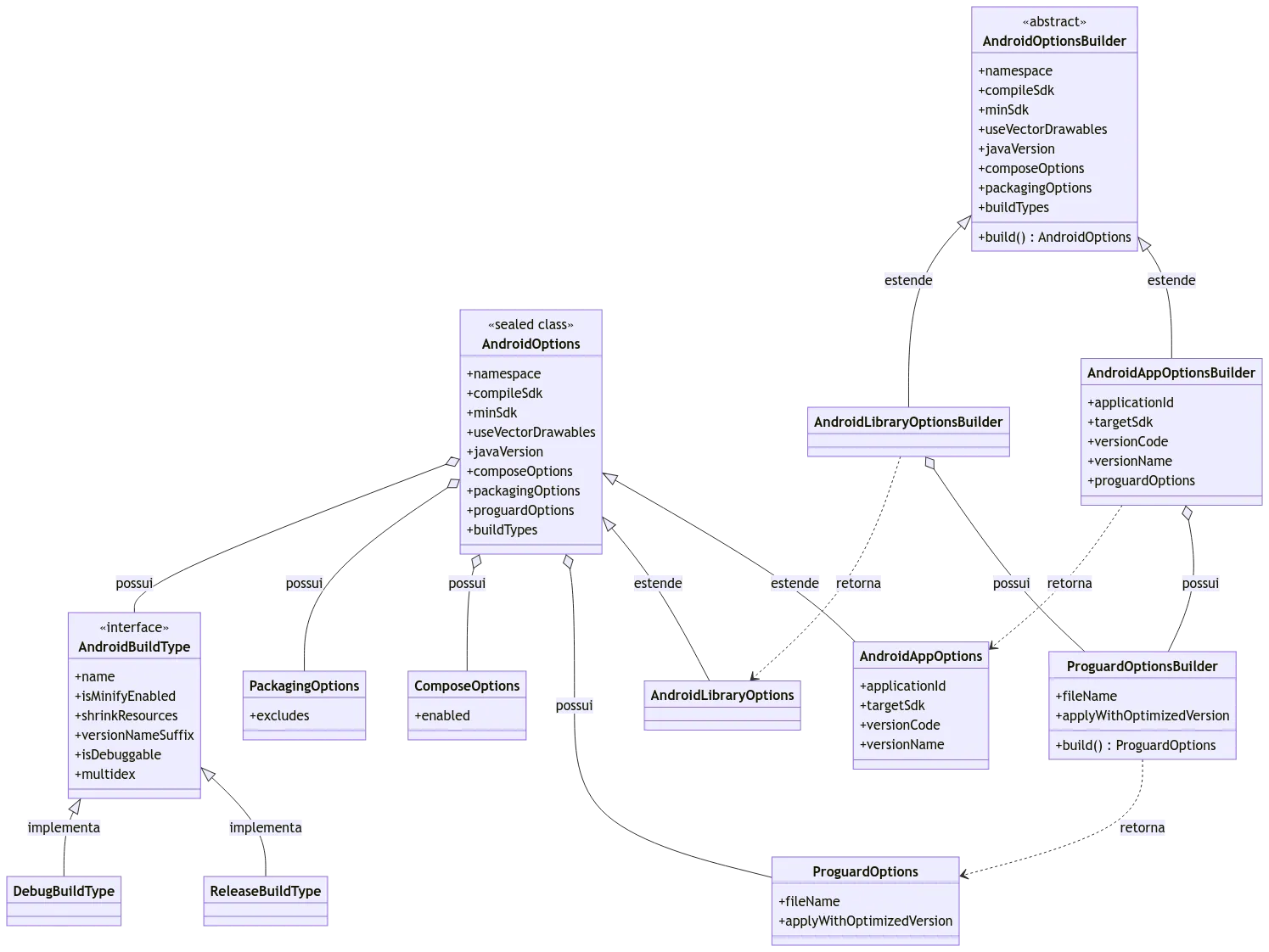
abstract class AndroidOptionsBuilder {

    var namespace: String = "com.rsicarelli.kplatform"
    var compileSdk: Int = 34
    var minSdk: Int = 24
    var useVectorDrawables: Boolean = true
    var javaVersion: JavaVersion = JavaVersion.VERSION_17
    var composeOptions: ComposeOptions = ComposeOptions()
    var packagingOptions: PackagingOptions = PackagingOptions()
    var buildTypes: List<AndroidBuildType> = listOf(ReleaseBuildType, DebugBuildType)

    abstract fun build(): AndroidOptions
}

class AndroidAppOptionsBuilder : AndroidOptionsBuilder() {

    var applicationId: String = "com.rsicarelli.kplatform"
    var targetSdk: Int = 34
    var versionCode: Int = 1
    var versionName: String = "1.0"
    private var proguardOptionsBuilder = ProguardOptionsBuilder("proguard-rules.pro")

    fun proguardOptions(init: ProguardOptionsBuilder.() -> Unit) {
        proguardOptionsBuilder.apply(init)
    }

    override fun build(): AndroidAppOptions = AndroidAppOptions(
        applicationId = applicationId,
        targetSdk = targetSdk,
        versionCode = versionCode,
        versionName = versionName,
        proguardOptions = proguardOptionsBuilder.build(),
        namespace = namespace,
        compileSdk = compileSdk,
        minSdk = minSdk,
        useVectorDrawables = useVectorDrawables,
        javaVersion = javaVersion,
        composeOptions = composeOptions,
        packagingOptions = packagingOptions,
        buildTypes = buildTypes
    )
}

class AndroidLibraryOptionsBuilder : AndroidOptionsBuilder() {

    private var proguardOptionsBuilder = ProguardOptionsBuilder("consumer-proguard-rules.pro")

    fun proguardOptions(init: ProguardOptionsBuilder.() -> Unit) {
        proguardOptionsBuilder.apply(init)
    }

    override fun build(): AndroidLibraryOptions = AndroidLibraryOptions(
        proguardOptions = proguardOptionsBuilder.build(),
        namespace = namespace,
        compileSdk = compileSdk,
        minSdk = minSdk,
        useVectorDrawables = useVectorDrawables,
        javaVersion = javaVersion,
        composeOptions = composeOptions,
        packagingOptions = packagingOptions,
        buildTypes = buildTypes
    )
}

class ProguardOptionsBuilder(defaultFileName: String) {

    var fileName: String = defaultFileName
    var applyWithOptimizedVersion: Boolean = true

    fun build(): ProguardOptions = ProguardOptions(
        fileName = fileName,
        applyWithOptimizedVersion = applyWithOptimizedVersion
    )
}
Exposing our builder in the androidApp() and androidLibrary() functions
Note that we pass an empty lambda as a parameter, which lets the module simply call it with the predefined options.
fun Project.androidApp(builderAction: AndroidAppOptionsBuilder.() -> Unit = { }) =
    applyAndroidApp(AndroidAppOptionsBuilder().apply(builderAction).build())

fun Project.androidLibrary(builderAction: AndroidLibraryOptionsBuilder.() -> Unit = { }) =
    applyAndroidLibrary(AndroidLibraryOptionsBuilder().apply(builderAction).build())
Usage
Usage is super fluid—look how we can customize versionCode and versionName in app/build.gradle.kts:
androidApp {
    // this is the AndroidAppOptionsBuilder
    versionCode = 1
    versionName = "1.0.0"

    proguardOptions {
        // this is ProguardOptionsBuilder
        applyWithOptimizedVersion = true
    }
}
Success!
Our configuration is now elegant, with an expressive and intuitive DSL that allows for plenty of customizations adaptable to different scenarios.
This approach lets us establish default behaviors for the modules, while also offering a robust DSL so the team can add new settings as needed.
In the next article, we’ll add a really important decoration to optimize the build time of our modules.