Android Plataforma - Part 10: Customizing the modules
By Rodrigo Sicarelli 6 min read Updated
In the last article, we explored CommonsExtension to remove duplication from our configuration.
Now let’s talk about situations where we need to change behavior, and how to enrich our platform with a custom DSL for building an AndroidOptions.
We still have duplication when defining our buildTypes, and on top of that we aren’t configuring Proguard correctly for our libraries.
But before solving that, it’s worth understanding how each module can have its own specific configuration.
Different modules, different configurations.
In a real application, it’s common for different modules to need some flexibility around the platform.
For example, maybe a module needs an extra build type, needs to change the “resource packing” rules to exclude certain files, or even needs a different namespace.
So how can we bring that flexibility into our platform?
Introducing the Options concept
Every setting in our platform can be adapted from a model, or options, giving us more control over a given module.
The idea is to create a model that specifies which options will be applied to each module.
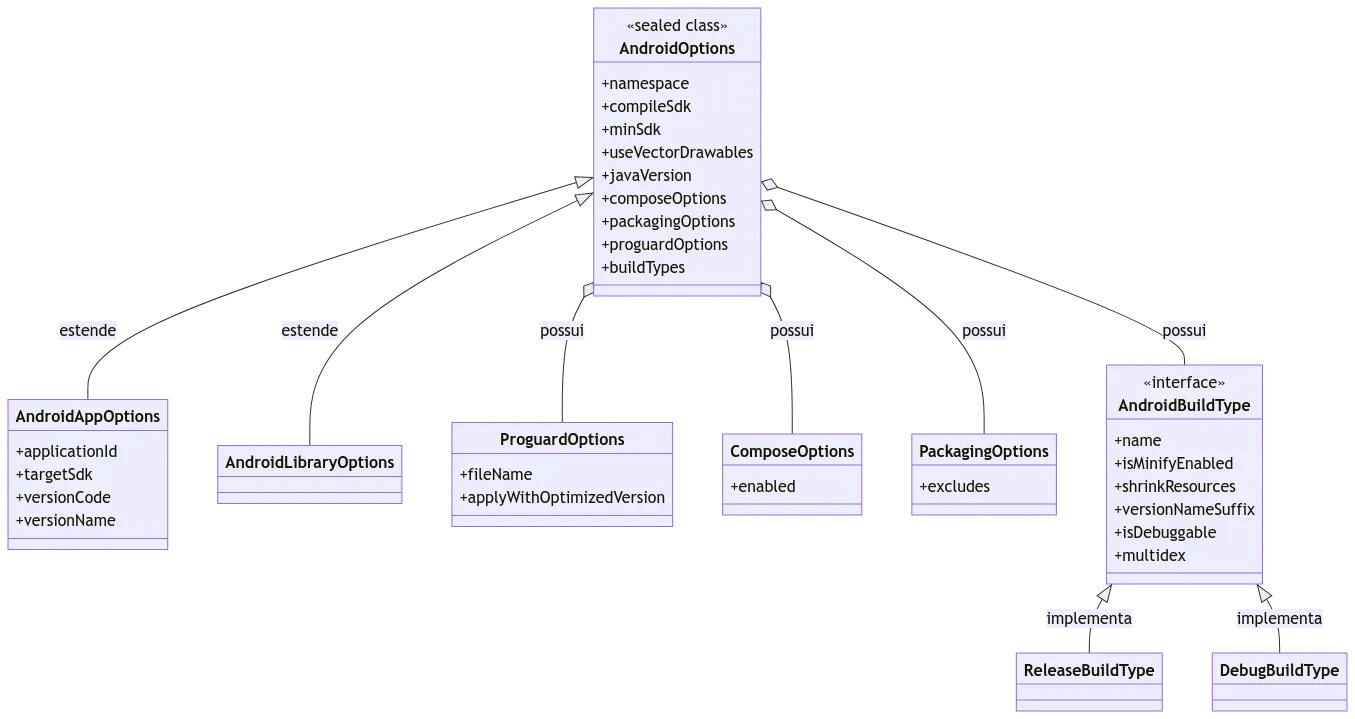
sealed class AndroidOptions(
    open val namespace: String,
    open val compileSdk: Int,
    open val minSdk: Int,
    open val useVectorDrawables: Boolean,
    open val javaVersion: JavaVersion,
    open val composeOptions: ComposeOptions,
    open val packagingOptions: PackagingOptions,
    open val proguardOptions: ProguardOptions,
    open val buildTypes: List<AndroidBuildType>,
) {

    data class AndroidAppOptions(
        val applicationId: String,
        val targetSdk: Int,
        val versionCode: Int,
        val versionName: String,
        override val proguardOptions: ProguardOptions,
        override val namespace: String,
        override val compileSdk: Int,
        override val minSdk: Int,
        override val useVectorDrawables: Boolean,
        override val javaVersion: JavaVersion,
        override val composeOptions: ComposeOptions,
        override val packagingOptions: PackagingOptions,
        override val buildTypes: List<AndroidBuildType>,
    ) : AndroidOptions(
        namespace = namespace,
        compileSdk = compileSdk,
        minSdk = minSdk,
        useVectorDrawables = useVectorDrawables,
        javaVersion = javaVersion,
        composeOptions = composeOptions,
        packagingOptions = packagingOptions,
        proguardOptions = proguardOptions,
        buildTypes = buildTypes
    )

    data class AndroidLibraryOptions(
        override val proguardOptions: ProguardOptions,
        override val namespace: String,
        override val compileSdk: Int,
        override val minSdk: Int,
        override val useVectorDrawables: Boolean,
        override val javaVersion: JavaVersion,
        override val composeOptions: ComposeOptions,
        override val packagingOptions: PackagingOptions,
        override val buildTypes: List<AndroidBuildType>,
    ) : AndroidOptions(
        namespace = namespace,
        compileSdk = compileSdk,
        minSdk = minSdk,
        useVectorDrawables = useVectorDrawables,
        javaVersion = javaVersion,
        composeOptions = composeOptions,
        packagingOptions = packagingOptions,
        proguardOptions = proguardOptions,
        buildTypes = buildTypes
    )
}

data class ProguardOptions(
    val fileName: String,
    val applyWithOptimizedVersion: Boolean = true,
)

data class ComposeOptions(
    val enabled: Boolean = true,
)

data class PackagingOptions(
    val excludes: String = "/META-INF/{AL2.0,LGPL2.1}",
)

interface AndroidBuildType {

    val name: String
    val isMinifyEnabled: Boolean
    val shrinkResources: Boolean
    val versionNameSuffix: String?
    val isDebuggable: Boolean
    val multidex: Boolean
}

object ReleaseBuildType : AndroidBuildType {

    override val name: String = "release"
    override val isMinifyEnabled: Boolean = true
    override val shrinkResources: Boolean = true
    override val versionNameSuffix: String? = null
    override val isDebuggable: Boolean = false
    override val multidex: Boolean = false
}

object DebugBuildType : AndroidBuildType {

    override val name: String = "debug"
    override val isMinifyEnabled: Boolean = false
    override val shrinkResources: Boolean = false
    override val versionNameSuffix: String = "debug"
    override val isDebuggable: Boolean = true
    override val multidex: Boolean = false
}
With this model in place, we can:
- Set up options shared across different Android module types using the
sealed classAndroidOptions. - Specify options for the app with
AndroidAppOptions. - Scope options for a library using
AndroidLibraryOptions. - Get more flexibility when defining the Proguard options.
- Make our platform agnostic, making it easier to integrate with other projects that have a different
applicationId, and so on.
Refactoring with AndroidOptions
1 - Create a file named AndroidOptions.kt at the root of the build-logic module and move the previous content into it.
Bring everything above into this file.
2 - Update the applyAndroidCommon() function to take AndroidOptions as an argument.
Update the function so it uses the values defined by the model:
private fun Project.applyAndroidCommon(androidOptions: AndroidOptions) =
    with(commonExtension) {
        namespace = androidOptions.namespace
        compileSdk = androidOptions.compileSdk

        defaultConfig {
            minSdk = androidOptions.minSdk

            vectorDrawables {
                useSupportLibrary = androidOptions.useVectorDrawables
            }
        }

        compileOptions {
            sourceCompatibility = androidOptions.javaVersion
            targetCompatibility = androidOptions.javaVersion
        }

        applyKotlinOptions()

        androidOptions.composeOptions.takeIf(ComposeOptions::enabled)
            ?.let {
                buildFeatures {
                    compose = true
                }

                composeOptions {
                    kotlinCompilerExtensionVersion = libs.version("composeKotlinCompilerExtension")
                }
            }

        packaging {
            resources {
                excludes += androidOptions.packagingOptions.excludes
            }
        }
    }
3 - Update our applyAndroidApp() and
applyAndroidLibrary() functions to receive and apply the model’s options, as well as call our applyAndroidCommon().
internal fun Project.applyAndroidApp(androidAppOptions: AndroidAppOptions) {
    applyAndroidCommon(androidAppOptions)

    extensions.configure<ApplicationExtension> {
        defaultConfig {
            applicationId = androidAppOptions.applicationId
            targetSdk = androidAppOptions.targetSdk
            versionCode = androidAppOptions.versionCode
            versionName = androidAppOptions.versionName
        }
    }
}
internal fun Project.applyAndroidLibrary(androidLibraryOptions: AndroidLibraryOptions) {
applyAndroidCommon(androidLibraryOptions)
extensions.configure<LibraryExtension> {
}
}4 - Let’s create a DSL to define the Proguard configuration.
The idea of this function is to delegate the consume function to the caller, leaving it to apply settings that are specific to each module type.
private fun <T> Project.setProguardFiles(
    config: T,
    proguardOptions: ProguardOptions,
    consume: T.(Array<Any>) -> Unit,
) {
    if (proguardOptions.applyWithOptimizedVersion) {
        config.consume(
            arrayOf(
                getDefaultProguardFile("proguard-android-optimize.txt", layout.buildDirectory),
                proguardOptions.fileName
            )
        )
    } else {
        config.consume(arrayOf(proguardOptions.fileName))
    }
}
5 - Update the applyAndroidApp() and applyAndroidLibrary() functions, setting Proguard up inside the defaultConfig { } block. Here you’ll have access to the proguardFiles and consumerProguardFiles functions:
internal fun Project.applyAndroidApp(androidAppOptions: AndroidAppOptions) {
    applyAndroidCommon(androidAppOptions)

    extensions.configure<ApplicationExtension> {
        defaultConfig {
            ..

            setProguardFiles(
                config = this,
                proguardOptions = androidAppOptions.proguardOptions,
                consume = { proguardFiles(*it) }
            )
        }
    }
}
internal fun Project.applyAndroidLibrary(androidLibraryOptions: AndroidLibraryOptions) {
applyAndroidCommon(androidLibraryOptions)
extensions.configure<LibraryExtension> {
defaultConfig {
setProguardFiles(
config = this,
proguardOptions = androidLibraryOptions.proguardOptions,
consume = { consumerProguardFiles(*it) }
)
}
}
}6 - Next, configure the buildTypes from the List<ApplicationBuildType>:
For the ApplicationExtension:
private fun ApplicationExtension.setAppBuildTypes(options: AndroidAppOptions) {
    fun ApplicationBuildType.applyFrom(androidBuildType: AndroidBuildType) {
        isDebuggable = androidBuildType.isDebuggable
        isMinifyEnabled = androidBuildType.isMinifyEnabled
        isShrinkResources = androidBuildType.shrinkResources
        multiDexEnabled = androidBuildType.multidex
        versionNameSuffix = androidBuildType.versionNameSuffix
    }

    buildTypes {
        options.buildTypes.forEach { androidBuildType ->
            when (androidBuildType) {
                DebugBuildType -> debug { applyFrom(androidBuildType) }
                ReleaseBuildType -> release { applyFrom(androidBuildType) }
                else -> create(androidBuildType.name) { applyFrom(androidBuildType) }
            }
        }
    }
}
For the LibraryExtension:
private fun LibraryExtension.setLibraryBuildTypes(options: AndroidLibraryOptions) {
    fun LibraryBuildType.applyFrom(androidBuildType: AndroidBuildType) {
        isMinifyEnabled = androidBuildType.isMinifyEnabled
        multiDexEnabled = androidBuildType.multidex
    }

    buildTypes {
        options.buildTypes.forEach { androidBuildType ->
            when (androidBuildType) {
                DebugBuildType -> debug { applyFrom(androidBuildType) }
                ReleaseBuildType -> release { applyFrom(androidBuildType) }
                else -> create(androidBuildType.name) { applyFrom(androidBuildType) }
            }
        }
    }
}
7 - Finally, wire all the pieces together:
internal fun Project.applyAndroidApp(androidAppOptions: AndroidAppOptions) {
    applyAndroidCommon(androidAppOptions)

    extensions.configure<ApplicationExtension> {
        defaultConfig {
            applicationId = androidAppOptions.applicationId
            targetSdk = androidAppOptions.targetSdk
            versionCode = androidAppOptions.versionCode
            versionName = androidAppOptions.versionName

            setProguardFiles(
                config = this,
                proguardOptions = androidAppOptions.proguardOptions,
                consume = { proguardFiles(*it) }
            )
        }

        setAppBuildTypes(androidAppOptions)
    }
}
internal fun Project.applyAndroidLibrary(androidLibraryOptions: AndroidLibraryOptions) {
applyAndroidCommon(androidLibraryOptions)
extensions.configure<LibraryExtension> {
defaultConfig {
setProguardFiles(
config = this,
proguardOptions = androidLibraryOptions.proguardOptions,
consume = { consumerProguardFiles(*it) }
)
}
setLibraryBuildTypes(androidLibraryOptions)
}
}Success!
With this change, we’ve made our settings more flexible, so we can, for example, enable Compose in a specific module.
There are still challenges ahead, though.
We need a way to let modules define these parameters.
One option would be to accept a predefined model, but in the next article we’ll build a DSL together, going for a smoother, more idiomatic approach in Kotlin, without having to create objects in individual modules.