Android Plataforma - Part 0: Introducing the Series
By Rodrigo Sicarelli 3 min read Updated
Android development is a constant stream of new things: new devices, SDK updates, and an endless variety of libraries and tools that ship every single day.
On top of that, add the constant changes, deprecations, and the business pressure to ship features that meet customer needs. This volatile landscape makes it a real challenge to keep our code organized, efficient, and scalable.
In this series of articles, I’ll walk you through the process of building an Android Platform.
What is a platform?
As you scale an Android project, you run into challenges like modularization and dependency management. The need for performance, optimization, UI/UX consistency, and backward compatibility also becomes more and more pressing.
A “platform” is a cohesive, well-defined set of practices, tools, and libraries that speed up development.
It stands out as a robust, scalable solution for tackling the challenges inherent to Android development, helping with things like modularization, optimization, continuous integration, testing, and security.
Building a Platform on Android
Throughout these articles, we’ll build a platform from scratch and integrate it with an existing project.
🔗 github.com/rsicarelli/kotlin-gradle-android-platform
- Modularization
- We’ll explore the reasons and ideas behind modularization on Android.
- Starting the Project
- We’ll introduce the base project that we’ll evolve and integrate with our platform.
- Sharing Gradle scripts
- We’ll cover
buildSrcand discuss how to share scripts across Gradle projects.
- We’ll cover
- Composite Build
- We’ll introduce this valuable Gradle feature and create a composite build to represent our platform.
- Simplifying Gradle Init
- We’ll take a closer look at the features our platform actually needs.
- Version Catalog
- We’ll introduce and implement Gradle’s version catalog.
- Decorating the ‘app’ module
- We’ll introduce the concept of “decorations” and delegate the
appmodule’s Gradle scripts to our platform.
- We’ll introduce the concept of “decorations” and delegate the
- Decorating the ‘library’ modules
- We’ll move on to our libraries and delegate their logic to our platform too.
- Unifying the Application and Library extensions with the Common Extension
- We’ll discuss
ApplicationExtension,LibraryExtension, andCommonsExtensionfrom the Android Gradle Plugin (AGP).
- We’ll discuss
- Customizing the modules
- We’ll parameterize our platform so the modules using it can be customized.
- We’ll build an idiomatic Kotlin way to apply our platform customizations.
- We’ll discuss the Android Gradle Plugin’s
BuildFeaturesand optimize the build of Android libraries.
- We’ll explore the reasons to keep modules leaner and avoid the extra steps of the Android Gradle Plugin.
- We’ll discuss the
@RequiresOptInannotation and how to adapt our platform to adopt experimental features.
- We’ll focus on code quality, using our platform to set our project up with code analysis and formatting tools.
- We’ll reflect on whether a platform is really needed, on good practices, and on the next steps for future series!
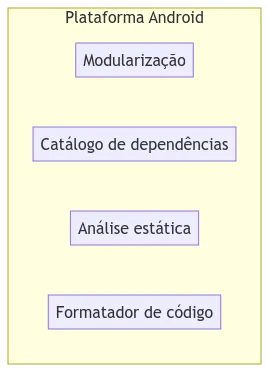
A spoiler of what we’ll learn
We’ll build a few decorations to apply in our build.gradle.kts files:
- Declaring an
appmodule through theandroidApp()function - Declaring
librarymodules through theandroidLibrary()function - Declaring pure JVM modules through the
jvmLibrary()function - Integrating
detektandspotlessas code quality tools.
import com.rsicarelli.kplatform.detekt
import com.rsicarelli.kplatform.spotless

plugins {
    alias(libs.plugins.android.application) apply false
    alias(libs.plugins.kotlin.android) apply false
    alias(libs.plugins.arturbosch.detekt) apply false
    alias(libs.plugins.diffplug.spotless) apply false
    id(libs.plugins.rsicarelli.kplatform.get().pluginId)
}

detekt()
spotless()
import com.rsicarelli.kplatform.androidApp
plugins {
id(libs.plugins.android.application.get().pluginId)
kotlin("android")
}
androidApp {
versionCode = 1
versionName = "1.0.0"
}
dependencies {
implementation(libs.androidx.activity.compose)
implementation(projects.core.designsystem)
implementation(projects.features.home)
}import com.rsicarelli.kplatform.androidLibrary
plugins {
id(libs.plugins.android.library.get().pluginId)
kotlin("android")
}
androidLibrary()
dependencies {
implementation(platform(libs.androidx.compose.bom))
implementation(libs.androidx.compose.ui)
}import com.rsicarelli.kplatform.jvmLibrary
plugins {
kotlin("jvm")
}
jvmLibrary()
dependencies {
implementation(libs.kotlinx.coroutines.core)
}Happy learning!
I hope you enjoy this content and learn a lot from it!
If you have any questions or run into trouble, don’t hesitate to reach out or leave a comment.
Start here: Part 1: Modularization